Binary File Formats Demystified: What Do PNG, JPEG, and MP4 Actually Look Like?
A hex-level dissection of the binary structure of common files — PNG, JPEG, MP3, MP4, ZIP, PDF — summarizing the universal patterns of binary layout (magic numbers, endianness, TLV chunks, index tables, frame sync, alignment, and checksums), plus a practical methodology for designing a binary format from scratch.

- Mason Zheng
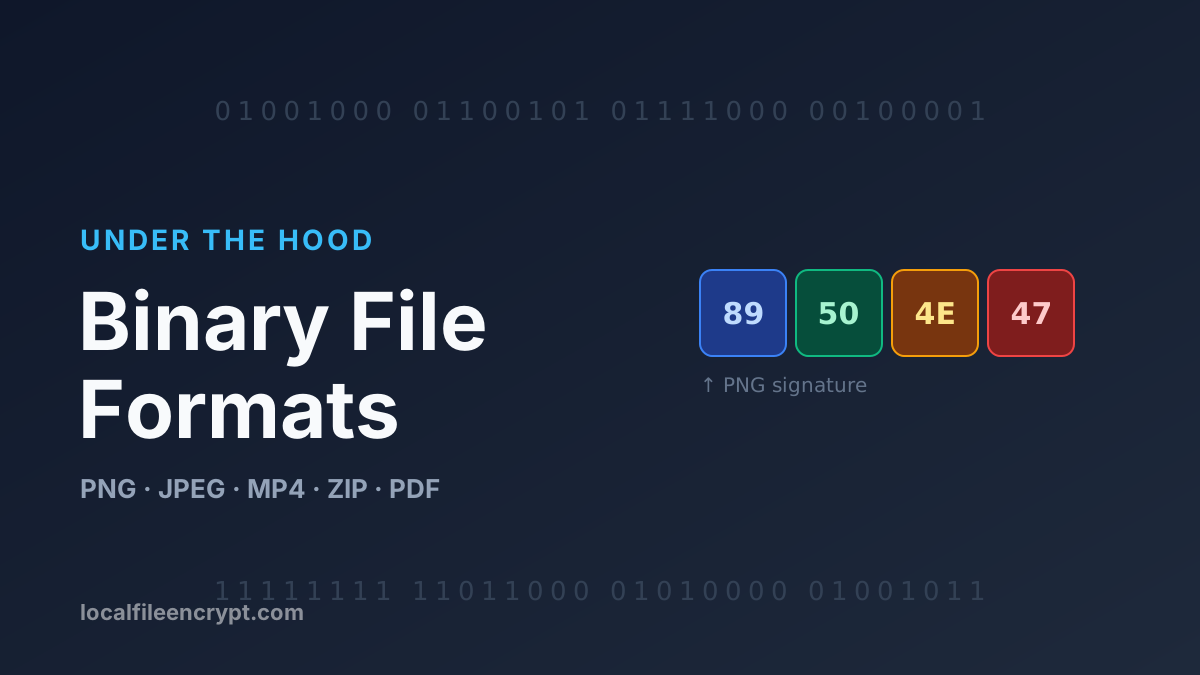
Open any .png or .mp4 file and all you see is a long string of bytes. Yet it’s precisely this seemingly chaotic string — arranged according to some pre-agreed structure — that lets an image be rendered or a video be played. That “agreement” is the binary file format.
Why not use a human-readable text format? Because for data like images, audio, and video, binary is more compact (no need to turn numbers into characters), faster to parse (read directly at fixed offsets), and more precise (controllable bit by bit). The price is that you can’t just open it in Notepad — you have to know the “agreement.”
This article lifts the veil on that agreement: first the universal building blocks of binary formats, then a hex-level dissection of common formats one by one, and finally the recurring patterns plus a methodology for designing your own.
1. The Universal Building Blocks of Binary Formats
Almost every binary format is assembled from the same handful of “parts.”

1.1 Magic Number (File Signature)
A few fixed bytes at the start of a file that identify “what format I am.” Operating systems and tools often determine file type not by extension, but by magic number. For example, a PNG always begins with 89 50 4E 47 (50 4E 47 is ASCII “PNG”).
1.2 Endianness
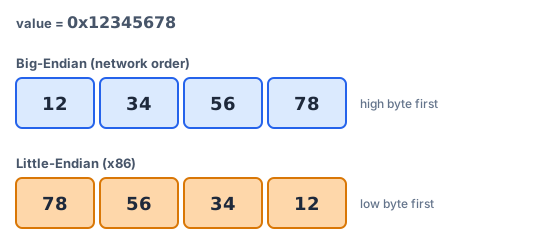
When a multi-byte integer (e.g., the 4-byte 0x12345678) is written to a file, there are two orderings:
- Big-Endian: most significant byte first →
12 34 56 78. Also called “network byte order”; used by PNG, JPEG, MP4, etc. - Little-Endian: least significant byte first →
78 56 34 12. The native order of x86 CPUs; used by WAV, ZIP, BMP, etc.
Read the wrong endianness and the values become complete nonsense, so a format must explicitly specify which one it uses.
1.3 Header + Body
The most classic layout: a fixed-length header at the start describes metadata (dimensions, version, offsets of each section), followed by the body data. On read, parse the header first and you’ll know how to read the rest.
1.4 Fixed-Length and Variable-Length Fields
- Fixed-length fields: e.g., “width takes 4 bytes” — you can jump directly to it by offset, which is fast.
- Variable-length fields: length isn’t fixed (e.g., a piece of text, an image). Here you need a way to know how long it is — usually a length prefix or a terminator marker.
1.5 TLV / Chunks (Box)
The most powerful extensible structure: cut the file into chunks, each carrying its own description. The classic form is TLV (Type-Length-Value):
[type][length][data...] [type][length][data...] ...

The benefit: when the parser encounters a chunk it doesn’t recognize, it can skip it by its length — achieving excellent forward compatibility. PNG, MP4, and RIFF all follow this idea.
1.6 Offset Table / Index
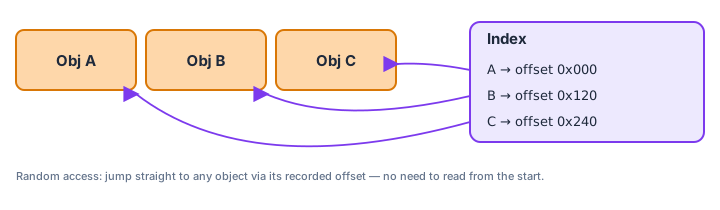
Place a “directory” somewhere in the file recording the byte offset of each object. This enables random access — no need to read from start to finish. PDF’s cross-reference table and ZIP’s central directory are both of this kind.
1.7 Alignment & Padding
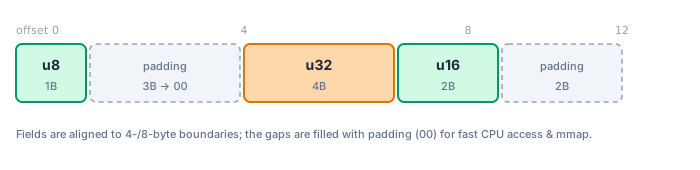
To let the CPU read efficiently (or to allow memory-mapping via mmap), fields are often aligned to 2-, 4-, or 8-byte boundaries, with 00 padding to fill the gaps.
1.8 Checksums and Versions
- Checksum / CRC: used to detect data corruption, like the CRC-32 at the end of each PNG chunk.
- Version number: written in the header, letting old and new parsers negotiate behavior — the key to a format’s long-term evolution.
2. Dissecting Common Formats (A Hex View)
2.1 PNG — Textbook Chunk Design
PNG is the best example for understanding “chunked formats.”
(1) The 8-byte signature:
89 50 4E 47 0D 0A 1A 0A
‰  P  N  G  \r \n ^Z \n
These 8 bytes are cleverly designed: the high bit of 89 detects 7-bit transfer corruption, PNG is the identifier, \r\n and \n detect newline conversions gone wrong, and ^Z (0x1A) makes the DOS type command stop early.
(2) Then comes a series of chunks, each with a fixed structure:
| Field | Length | Description |
|---|---|---|
| Length | 4 bytes (big-endian) | Byte count of the data area (excluding this field, type, and CRC) |
| Type | 4 bytes ASCII | Chunk type, e.g., IHDR, IDAT, IEND |
| Data | Length bytes | Chunk data |
| CRC | 4 bytes | CRC-32 computed over Type+Data |
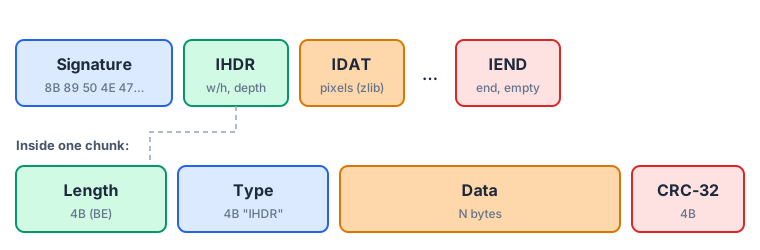
Key chunks: IHDR (image header — width, height, bit depth, color type) → IDAT (zlib-compressed pixel data, may span multiple chunks) → IEND (end marker, empty data).
The cleverest design — chunk types encode properties via letter case: an uppercase first letter means “critical,” lowercase means “ancillary.” A decoder can safely skip ancillary chunks it doesn’t recognize — elegant forward compatibility.
2.2 JPEG — Marker-Driven
JPEG uses markers beginning with FF to delimit segments, big-endian.
FF D8                  SOI  Start of Image
FF E0 .. (JFIF header) APP0 application segment
FF DB .. (quant table) DQT
FF C0 .. (frame info)  SOF0 dimensions, components
FF C4 .. (Huffman)     DHT
FF DA .. (scan header) SOS  followed by entropy-coded compressed data
...                    compressed data
FF D9                  EOI  End of Image

Most markers are followed by a 2-byte big-endian length. One detail to note: if FF appears inside the compressed data, it’s padded as FF 00 (byte-stuffing) to avoid being mistaken for a marker.
2.3 MP3 — “Frame Sync” with No Global Header
MP3 has no unified header; it’s a series of independent frames, each with a 4-byte header beginning with 11 consecutive 1-bits (the frame sync word, roughly FF Ex):
[optional ID3v2 tag] [frame][frame][frame]...[frame] [optional ID3v1 tag]
   "ID3"...              ↑each frame header has bitrate/sample rate     last 128 bytes "TAG"...
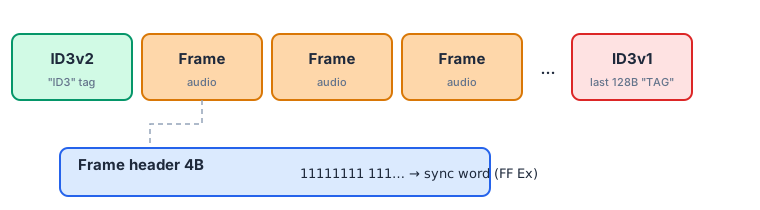
Players locate frames by “scanning for the frame sync word,” so MP3 naturally supports streaming playback and seeking to any position (a radio stream you tune into mid-way can be decoded immediately). ID3 tags hold metadata like title and artist.
2.4 MP4 / ISO-BMFF — Nested “Boxes”
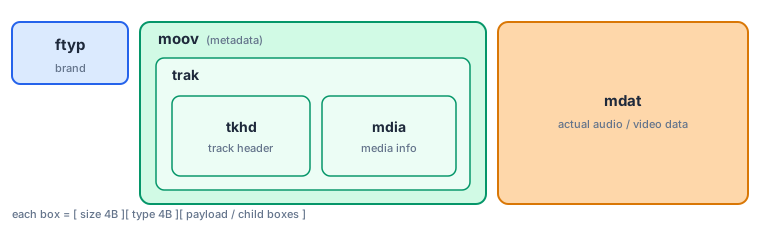
MP4 belongs to the ISO Base Media File Format, composed of nestable Boxes (also called Atoms), big-endian:
[4-byte size][4-byte type][data / child boxes...]
sizeincludes the 8-byte header itself; ifsize == 1, a 64-bit largesize field follows (supporting huge files); ifsize == 0, it extends to the end of the file.- Typical boxes:
ftyp(file type / brand, must come first),moov(metadata describing tracks, duration, indexes),mdat(the actual audio/video data).
Boxes nest layer upon layer (moov contains trak, which contains more boxes), forming a tree.
2.5 RIFF / WAV — A Little-Endian Container
WAV is based on the RIFF container (so are AVI and WebP), little-endian, and is essentially TLV too:
"RIFF"[total length]"WAVE" "fmt "[length][sample rate/channels...] "data"[length][PCM samples...]
2.6 ZIP — Read from the Tail
ZIP’s design is counterintuitive: the key index is at the end of the file.
[local file header PK\03\04][file 1 data] [PK\03\04][file 2 data] ...
[central directory PK\01\02 ... one entry per file]
[End Of Central Directory (EOCD) PK\05\06]   ← at the very end, records the central directory's offset
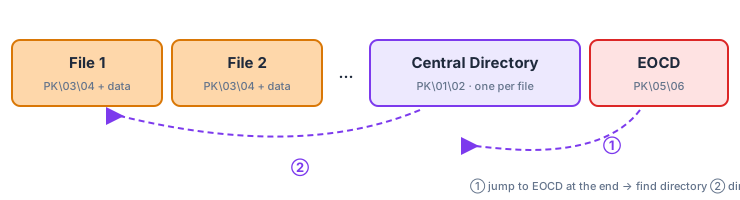
A parser jumps to the end of the file to find the EOCD first, reads the central directory’s location, then locates each file accordingly. This is exactly why arbitrary data can be prepended to a ZIP file (self-extractors, other formats) and it still unzips correctly.
2.7 PDF — A Hybrid of Text and Binary
PDF is peculiar: its skeleton is ASCII text, but it embeds binary streams, and it’s parsed starting from the tail of the file:
%PDF-1.7                  ← header, declares the version
12 0 obj << ... >>
stream ...(binary)... endstream endobj   ← an indirect object, may contain a compressed stream
...more objects...
xref                       ← cross-reference table: object number → byte offset
trailer << /Root 1 0 R /Size 13 >>
startxref
116544                     ← the byte offset where the xref table lives
%%EOF                      ← end of file
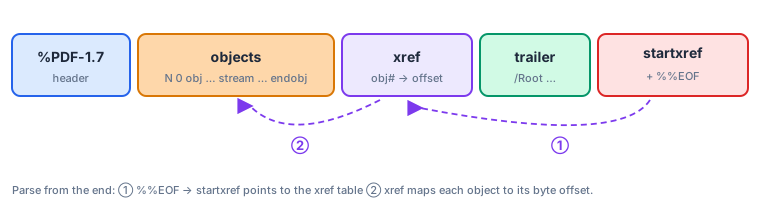
A reader first finds the trailing %%EOF and startxref, jumps to the xref table, then randomly accesses any object via its offset. This “index table + indirect references” design lets PDF support incremental updates (just append new objects and a new xref to the end of the file).
2.8 Magic Number Cheat Sheet
| Format | Starting bytes (hex) | ASCII |
|---|---|---|
| PNG | 89 50 4E 47 0D 0A 1A 0A | .PNG.... |
| JPEG | FF D8 FF | — |
| GIF | 47 49 46 38 | GIF8 |
25 50 44 46 | %PDF | |
| ZIP / docx / jar | 50 4B 03 04 | PK.. |
| MP3 (ID3v2) | 49 44 33 | ID3 |
| MP4 | (at offset 4) 66 74 79 70 | ftyp |
| WAV / AVI / WebP | 52 49 46 46 | RIFF |
| ELF executable | 7F 45 4C 46 | .ELF |
| Java class | CA FE BA BE | — |
Want to verify it yourself? In a terminal,
xxd file.png | headorhexdump -C file.png | headshows you exactly these bytes.
3. Universal Patterns of Binary Layout
Comparing the examples above side by side reveals a few patterns that never change at their core:
- Self-describing: put a magic number + version at the start so the file can “announce itself.”
- Header + body: metadata first, data after — practically the default paradigm.
- Chunked / TLV: cut into Type-Length-Value chunks, and combined with “skip unknown chunks,” achieve extensibility and forward compatibility (PNG, MP4, RIFF).
- Index / directory: use an offset table for random access (PDF’s xref, ZIP’s central directory).
- Frame sync: use a fixed sync word so a data stream can be entered at any point (MP3).
- Alignment and checksums: alignment for performance, CRC for integrity.
At a higher level, there are two design philosophies:
- Streaming: process as you read, no complete file needed — ideal for network transfer and play-while-downloading: PNG, MP4, MP3.
- Random-access: jump on demand via a tail/embedded index — ideal for partial reads of large files and incremental updates: PDF, ZIP.
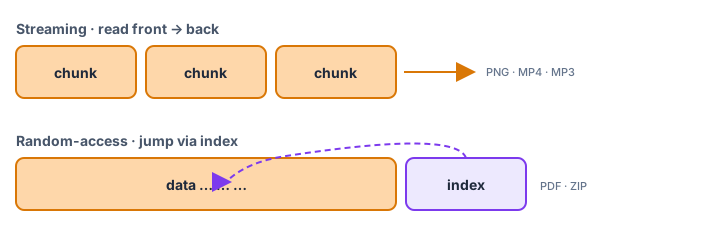
And two endianness camps: big-endian (networking and multimedia: PNG/JPEG/MP4) and little-endian (the x86 ecosystem: WAV/ZIP/BMP).
4. How to Design a Binary Format
If one day you need to design a file format for your own project, this checklist will help you avoid the common pitfalls.
① Put a magic number + version at the start. So the file is identifiable and compatible with future versions. The version number is an escape hatch for “future you.”
② Pick an endianness and write it into the spec. With no special reason, use big-endian (network byte order) or simply reuse an existing convention — and stay consistent throughout.
③ Length-prefix everything. Always write the length before the content of a variable-length field, avoiding the need to “scan for a terminator” while parsing — faster and safer (guards against overruns).
④ Prefer a TLV / chunked structure. It gives you near-free extensibility: add a feature by adding a new chunk, and old parsers skip chunks they don’t recognize by length. Borrow PNG’s “critical/ancillary” flag bit to distinguish “must understand” from “optional” chunks.
⑤ Consider alignment. If you want to mmap a struct directly or chase read performance, align fields to 4/8-byte boundaries.
⑥ Add integrity checks. At minimum, add a CRC32 or hash over the critical regions to catch corruption and tampering early.
⑦ Reserve fields. Leave a few reserved bytes set to 0 in the header, leaving room for future expansion.
⑧ Reuse mature solutions first; don’t reinvent the wheel. In most cases you don’t need to design from scratch:
- General structured data → Protocol Buffers, FlatBuffers, Cap’n Proto, CBOR, MessagePack;
- Need a container/nesting → extend directly on top of RIFF or ISO-BMFF.
The header design of a “toy format” might look roughly like this:
Offset  Length  Field
0       4       magic = "MYF1"
4       2       version (u16, big-endian)
6       2       flags
8       8       payload_length (u64, big-endian)
16      ...     payload: a series of TLV records
                each record = [type:2][length:4][value:length]
tail    4       crc32 (covers everything before it)

⑨ Write documentation. Binary formats are not self-explanatory — a clear byte-layout specification is worth as much as the format itself.
5. An Encrypted File Is Also a Binary Format
Once you understand all the above, an “encrypted file” is no longer mysterious — it, too, is a binary layout governed by convention. A typical encrypted file is roughly:
[magic/version][salt][initialization vector IV/nonce][ciphertext...][authentication tag]

To decrypt, the program slices out each part according to this layout: it derives the key from the salt and your passphrase, initializes the algorithm with the IV, verifies with the auth tag that the ciphertext hasn’t been tampered with, and finally recovers the plaintext. What LocalFileEncrypt.com produces when encrypting with AES-256-GCM is exactly such a self-contained chunk of binary data — done locally in your browser, never uploaded, and decryptable by any compatible tool on your own (see How Do We Encrypt Your Data).
Conclusion
There’s no magic in files. Behind every PNG, MP4, and PDF lies an agreement on “how to arrange the bytes.” Master the universal building blocks — magic numbers, endianness, headers, TLV chunks, index tables, frame sync, alignment, and checksums — and you can read almost any binary format, and when needed, design your own that’s clear, extensible, and built to evolve. The next time you open a file with hexdump, what you see will no longer be gibberish, but an elegant piece of engineering design.